Liaison Education
Higher education technology company. skie cut its AWS costs by $1.8M a year while keeping performance and scalability.
Read the Liaison Education case study →
Sage is skie's cost optimization engine for AWS. It right-sizes your resources, from compute through databases and storage, plans which commitments to buy, and reconciles the two in a single pass, because changing one changes the answer to the other. Then it applies the changes for you, inside a maintenance window you have already approved.
Efficiency that frees budget and engineering time for what you build next on AWS. Available through AWS Marketplace.
Recommendations become results
Most tools hand you a list and wish you luck. The reason those lists sit untouched for months is rarely disagreement. Right-sizing an instance means stopping and starting it, and nobody wants to open a change window purely to save money. Sage removes that problem by attaching the change to a window you already run.
A right-sizing run produces the proposed instance type change, with the resource, account and region attached.
The change becomes a tracked action, set to apply on your next OS patch. The downtime is already budgeted, so the resize costs nothing extra in risk or coordination.
skie Guardian carries out the change during the patch window, alongside the maintenance work you were doing anyway.
The result is written onto the recommendation, with timestamps and a status. Applied, pending and cancelled actions are counted, and failures stay visible rather than disappearing.

Automated implementation is available today for EC2, RDS and EBS. The estates it runs against include production SAP S/4HANA and HANA database instances.
The other is Guardian, which runs the estate day to day and applies these changes as part of that operation, which is why the recommendations on this page turn into results rather than backlog. See how Guardian operates the estate →
One solve, not three
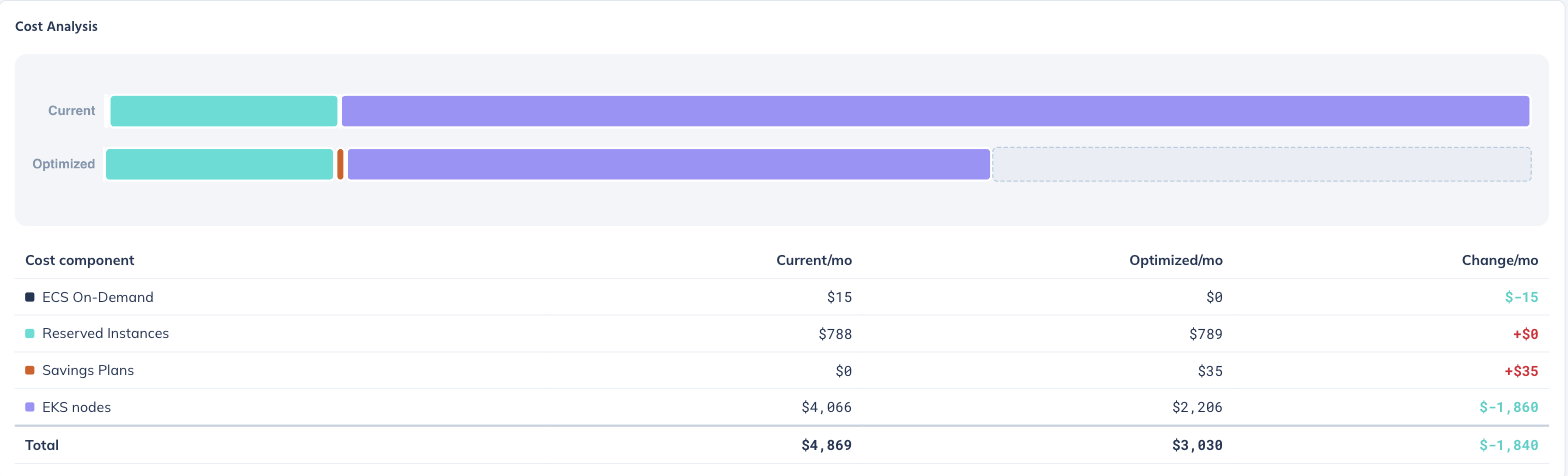
Savings Plans and Reserved Instances are shared across EC2, ECS and EKS. Optimize any one of them on its own and you get the other two wrong. Sage solves all three in one run, so the commitment plan reflects the footprint you will actually have after right-sizing rather than the one you have today.
What that looks like in a single optimization run
| What the run does | Why it matters |
|---|---|
| Cuts right-sizing spend and raises commitment spend in the same plan | Right-sizing changes the shape of your usage, so the correct commitment position changes with it. Sometimes the cheapest total means buying more commitment, not less. A tool that treats the two separately cannot reach that answer. |
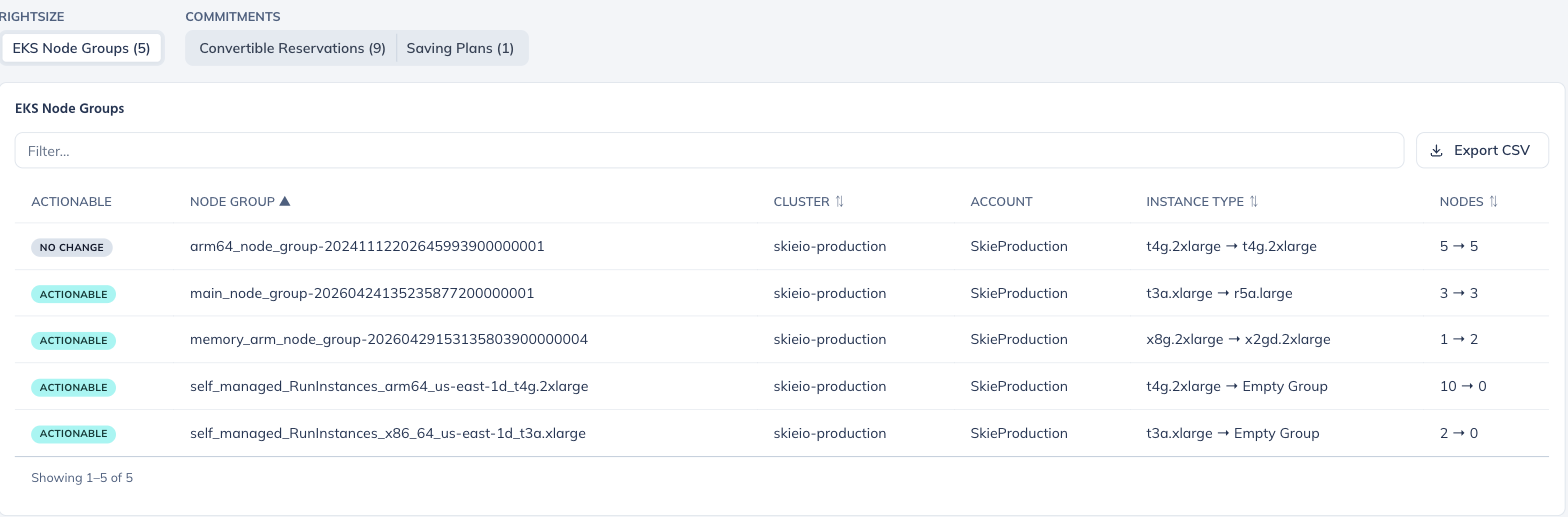
| Scales one node group up while emptying others | Consolidating workloads onto fewer, better matched node groups can mean growing one of them. The total falls even though a line item rises. |
| Flags Reserved Instances and Savings Plans as over-committed | Sage tells you when you are committed beyond the usage you can cover, reconciling every individual commitment against its measured monthly utilization. It is the opposite of the usual incentive to sell you more commitment. |
| Treats EKS as a fleet | Node groups are sized on nodes, cores and memory together, rather than one instance at a time, which is the only way the numbers come out right for Kubernetes. |
| Carries reservation coverage next to every proposal | A resize is never recommended without showing what the current instance is covered by. This is the disconnected-decision problem that raises costs when tools work in isolation. |


Beyond compute
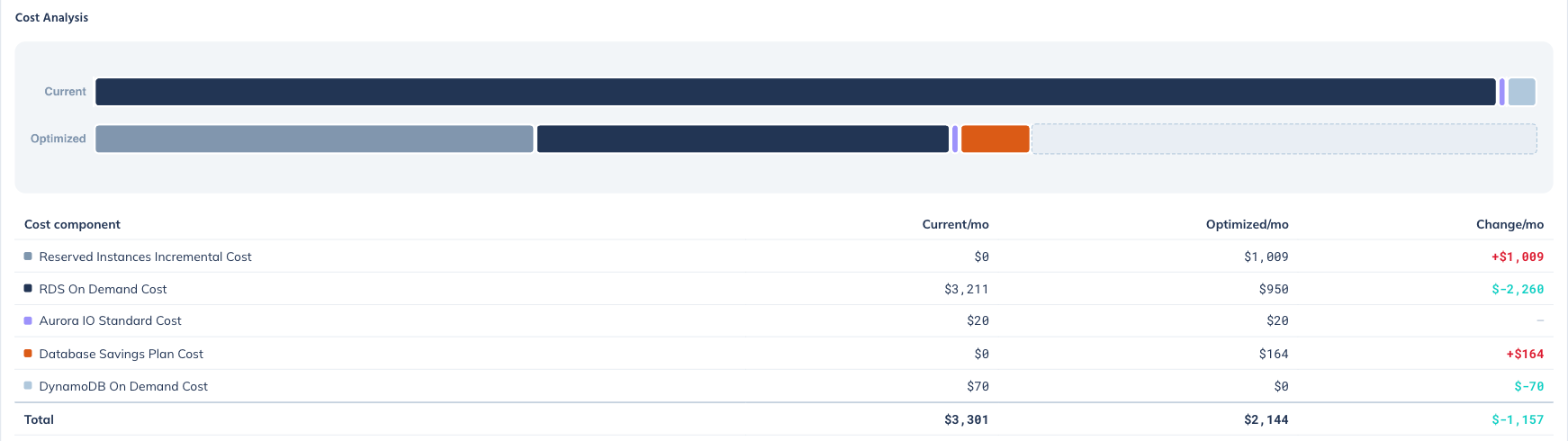
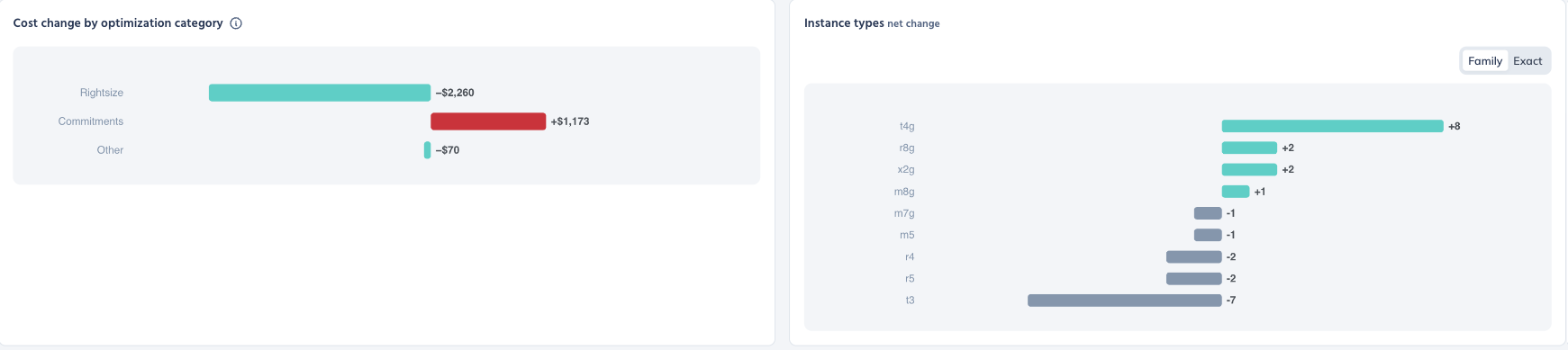
No. Databases and storage are optimized the same way, and they carry their own commitment instruments rather than borrowing the compute model. A database run reaches across RDS, Aurora and DynamoDB in a single pass, weighing reserved instances and database savings plans against the sizing changes it is proposing at the same time.
Two measures
Two measures, and they answer different questions. One tells you how well sized your compute is. The other tells you how well covered that compute is, and what you are paying for and not using. Both are tracked continuously, so the answer is a number rather than an opinion.
Raw CPU percentages are misleading across a mixed fleet, because a busy small instance and an idle large one do not carry equal weight. Sage normalizes for that: every instance type is weighted by its relative compute capacity, then utilization is measured at the p90 to p99 range rather than the average, so short peaks are not hidden by long quiet periods. The result is one figure for the whole estate.
Right-sizing changes what you need to cover, so coverage has to be read against the sized footprint rather than the original one. Alongside it, Sage tracks the commitments you are paying for and not using, and when your existing commitments expire.


Deliverables
Three concrete outputs from every run, all exportable.
Per resource: the current and proposed instance type, the account and region, an efficiency score before and after, and the commitment coverage already attached to it. Resources that should be left alone are labelled as such rather than quietly dropped.
Line items you can execute: region, instance family, platform, term, payment option, hourly rate and annual cost, split across Instance Savings Plans, Compute Savings Plans and Convertible Reserved Instances.
How many instances would change family or vCPU count if you acted on the plan. The cost of acting is stated up front, not discovered afterwards.
Under the hood
Sage plans commitments as a portfolio over a three-year horizon, quarter by quarter, using mixed-integer linear programming. It is a solver, not a set of rules of thumb, which is why it can trade instruments off against each other instead of applying them one at a time.
| Step | What happens |
|---|---|
| Existing commitments first | Reserved Instances and Savings Plans you already hold are modelled as fixed coverage that expires on its own schedule. Everything Sage proposes is incremental on top of what you own. |
| Coverage quarter by quarter | Demand is covered across twelve quarters. Each quarter shows which source covers what, and what is left uncovered at on-demand rates. |
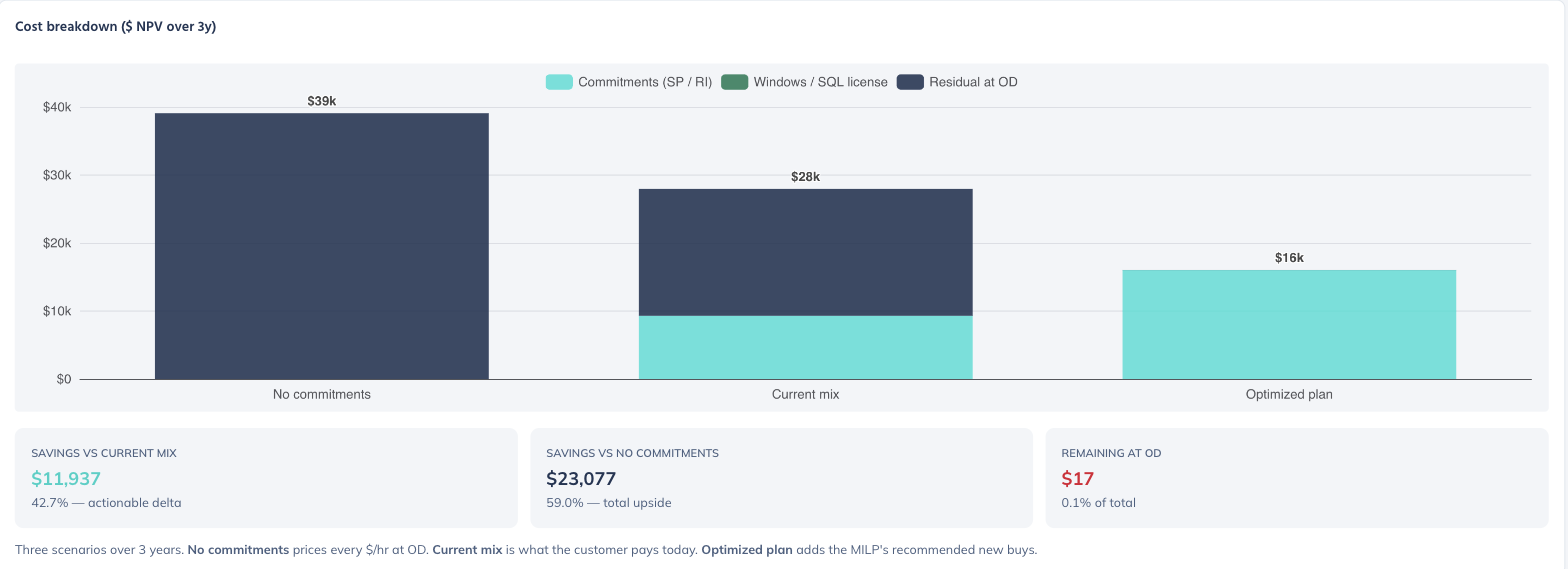
| Three priced scenarios | What you would pay with no commitments at all, what your current mix costs, and what the optimized plan costs. Savings are always quoted against a stated baseline rather than as a floating percentage. |
| Versioned runs | Every run is kept as a dated snapshot, so plans can be compared over time and a decision can be traced back to the state it was made in. |
Service coverage
Sage analyzes and optimizes a focused set of services, and gives you visibility across a much broader estate. The distinction is deliberate. Deep optimization is applied where it pays for itself.
| Service | Depth | What Sage does |
|---|---|---|
| EC2 | Optimized | Right-sizing and re-typing, commitment planning, automated implementation |
| ECS | Optimized | Included in the shared compute commitment solve |
| EKS | Optimized | Node group fleet sizing across nodes, cores and memory, plus the shared commitment solve |
| RDS | Optimized | Right-sizing, reserved instance planning, automated implementation |
| EBS | Optimized | Volume type and size optimization, automated implementation |
| ElastiCache | Optimized | Right-sizing and reserved node planning |
| OpenSearch | Optimized | Right-sizing and reserved instance planning |
| S3, EFS, FSx | Visibility | Inventory, spend attribution and reporting |
| DynamoDB, Redshift, Timestream | Visibility | Inventory, spend attribution and reporting |
| Load balancers, NAT gateways, elastic IPs | Visibility | Inventory and spend attribution, with idle resource reporting |

After optimization
Optimization is not the end state. It is what creates the room to build.
Customer arc
One customer's AWS consumption fell from roughly $44K a month to $29K after the first optimization pass, then grew to $126K as they expanded onto the platform, with no additional cloud operations headcount. The growth landed on an optimized baseline rather than an inherited one, so the new workloads were sized correctly from the day they were built.
See how this works for growing teamsMonthly AWS consumption for a single customer estate. Figures rounded. Consumption growth reflects new workloads the customer chose to build; it is reported alongside the optimization work, not attributed to it.
Common questions
Start with your own numbers
A free assessment runs against your real usage and returns the same right-sizing recommendations, commitment plan and disruption estimate described on this page.