

Your always-optimized cloud starts here.
Sage combines FinOps automation with expert guidance to reduce cloud costs by 25-50% across AWS and Azure. Right-sizing and commitments are planned together, and you pay only on the savings achieved.
Why most tools fall short
The connected intelligence difference.
Tools that work in silos make recommendations that look sensible on their own and raise costs or break systems in combination.
Blind to commitments
A resize that fights your reservation.
- A tool proposes a smaller instance without knowing a 3-year reservation already covers the current one
- You pay for the reservation and the new instance
Blind to certification
A family switch that breaks SAP.
- A tool proposes a cheaper instance family without checking SAP HANA certification
- The change saves money on paper and takes you out of support
Commitments, certifications, utilization and cost are solved together, so every recommendation is one you can actually apply.
Recommendations become results
Who implements the recommendations?
Sage recommends
Each proposal shows the resource, the change, the saving and the commitment coverage on it.
An action is scheduled
Approved changes become scheduled actions for the next patch window you control.
Guardian executes it
Guardian applies the change in the window. EC2, RDS and EBS are automated, including production SAP S/4HANA and HANA databases.
The outcome comes back
Every action leaves a record: status, timestamps, before and after. Failures stay visible.
A completed change, end to end
Raised on 13 August, applied on 15 August in the account’s patch window. Status, instance, region, previous and new type, created and completed dates, all on one record.

One solve, not three
Why optimize EC2, ECS and EKS together?
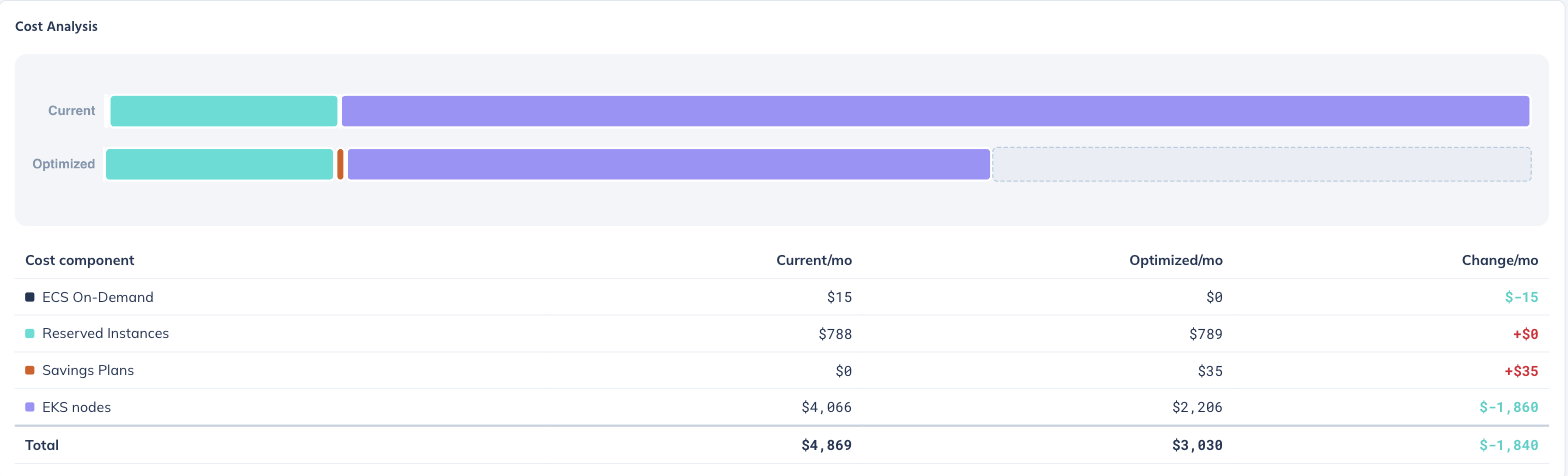
Savings Plans and Reserved Instances are shared across all three, so sizing one service without the others leaves commitments stranded or over-bought.
- Right-sizing and commitment spend are planned together, not in sequence
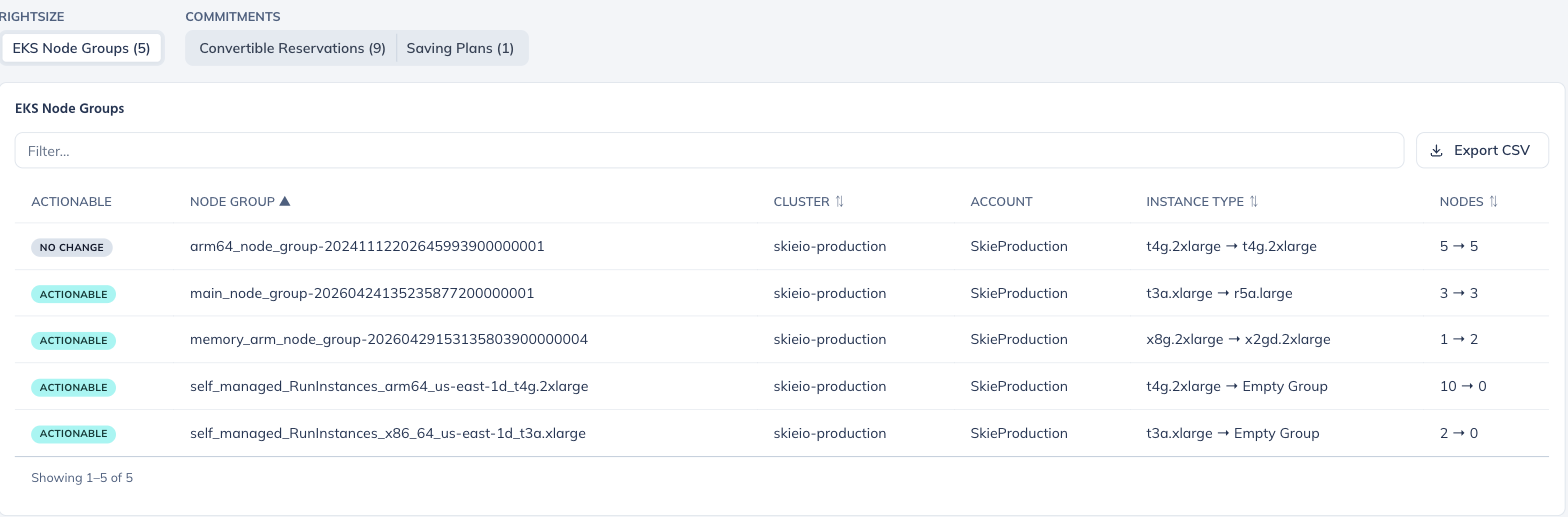
- Some node groups are scaled up while others are emptied
- Over-committed Reserved Instances and Savings Plans are flagged
- EKS is treated as a fleet, not node by node
- Reservation coverage is shown beside every proposal


Beyond compute
Does this only cover compute?
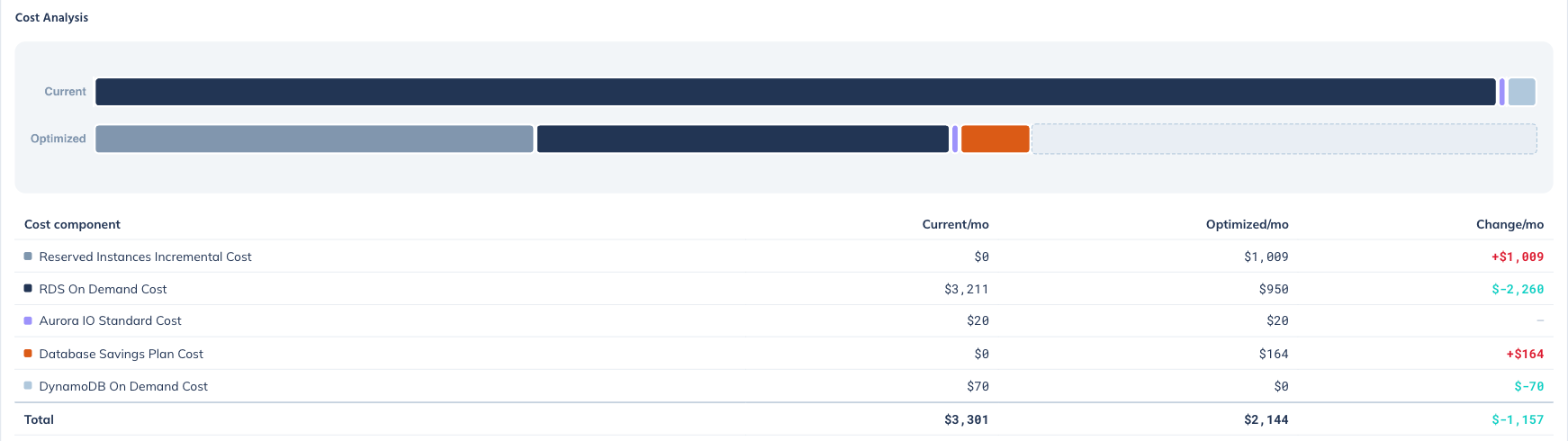
No. Databases use their own commitment instruments, so RDS, Aurora and DynamoDB are optimized in one pass: reserved instances, database savings plans and sizing together. Most of the saving comes from moving to newer families, including ARM-based ones, rather than only shrinking.
Capacity-weighted utilization, p90-p99
Sage weights utilization by instance capacity and measures at the 90th to 99th percentile rather than averages, giving one estate-wide figure you can track month to month.

Coverage against the sized footprint
Coverage is measured against what you will run after right-sizing, not what you run today. Unused commitment and upcoming expirations are tracked in dollars and as a share of spend.

The Sage Commitment Portfolio Engine
Turn complex cloud commitments into maximum savings.
Commitments bought one at a time
| On-demand, no discount | 40% |
| 1-year commitment, 30% off | 25% |
| 3-year commitment, 50% off | 35% |
A layered commitment portfolio
| Standard RI + volume discount · 20% coverage | 75% |
| Instance Savings Plans · 25% coverage | 70% |
| Compute Savings Plans · 30% coverage | 50% |
| Convertible RIs · 25% coverage | 50% |
A modelled example using AWS list rates for a representative estate. Actual results depend on your usage mix.
Four stages, repeated
How Sage builds your optimal commitment portfolio
Deep usage analysis
Hourly usage across all instances; Graviton and modernization options; Spot eligibility.
Commitment strategy design
Instance-family standardization, multi-year discount optimization, regional vs. global coverage.
Portfolio construction
Layered commitments for maximum coverage, flexibility balanced against discount depth, volume discounts and spreading options.
Continuous optimization
Utilization monitored in real time, adjusted for workload changes, new instance families pursued as they arrive.
| The Sage advantage | Basic approach | Sage portfolio |
|---|---|---|
| Blended discount | 25% | 60% |
| Considers hourly patterns | Not included | Included |
| Instance standardization | Not included | Included |
| Commitment flexibility | Not included | Included |
| Spreading capability | Not included | Included |
| Expert review | Not included | Included |
“Sage transformed how we think about cloud commitments. 58% savings with less risk than we carried before.”
VP Infrastructure, Fortune 500 companyDeliverables
What do you actually get?
Three exportable outputs from every run.
Right-sizing recommendations
For each resource: current and proposed type, account and region, efficiency score before and after, and existing commitment coverage. Resources to leave alone are labelled, not dropped.
Commitment buy plan
Executable line items: region, family, platform, term, payment option, hourly rate and annual cost, split across Instance Savings Plans, Compute Savings Plans and Convertible RIs.
Disruption estimate
How many instances would change family or vCPU count if the plan is applied, so the cost of acting is known before you act.
Coverage
What Sage optimizes.
Major cloud services on AWS and Azure.
- AWS EC2 instances
- AWS compute reservations and Savings Plans
- AWS container services (ECS, EKS)
- Azure Virtual Machines and scale sets
- Azure VM reservations and savings plans
- Licensing: Microsoft, Oracle, SUSE
- AWS S3 buckets and lifecycle
- AWS EBS volumes
- AWS EFS and FSx
- Azure managed disks, Files and Blobs
- Azure storage reservations
- Backup and archives
- AWS RDS instances
- AWS ElastiCache, Redis and Valkey
- AWS OpenSearch
- Azure SQL Database and Managed Instance
- Azure Database for PostgreSQL
- Database reservations
- AWS load balancers
- AWS Elastic IP
- Commitment portfolio management
- Automation: applying recommendations
| AWS depth by service | Level | What that covers |
|---|---|---|
| EC2, ECS, EKS, RDS, EBS, ElastiCache, OpenSearch | Optimized | Right-sizing and commitment planning; automated implementation for EC2, RDS and EBS. ECS and EKS share the compute commitment solve; EKS is sized as a node fleet. |
| S3, EFS, FSx · DynamoDB, Redshift, Timestream · load balancers, NAT gateways, elastic IPs | Visibility | Inventory, spend attribution and reporting; idle-resource reporting for load balancers, NAT gateways and elastic IPs. |

Sage for AWS
EC2, ECS, EKS, RDS and more. Right-sizing and commitment planning in one pass, with approved changes applied in the patch window.
See Sage for AWS →Sage for Azure
Virtual machines, SQL and disks. Sizing and reservation decisions made together.
See Sage for Azure →Why teams choose Sage
Savings you can count on, with no risk.
25-50% cost reduction
Most customers see results within 90 days. Across the customer base in 2025, realized cloud spend fell 41% on average against the pre-optimization run rate.
Zero-risk model
You pay only on achieved savings. No upfront or monthly fees.
Expert support
Certified FinOps and DevOps experts guide each optimization.
Multi-cloud ready
One platform for AWS and Azure.
Automated execution
Recommendations can be applied automatically and integrate with the tools you already run.
Continuous optimization
Ongoing monitoring keeps the estate efficient as usage changes.
Proven results
Navisite: “We saved $3M annually in just 7 months.”
Enterprise ready
Multi-account environments, instance-family standardization and organization-wide commitments.
After optimization
What happens after the spend comes down?
Optimization creates room to build. One customer’s AWS spend fell from about $44K to $29K a month after the first pass, then grew to $126K as they expanded, with no added cloud-operations headcount. New workloads were sized correctly from the start.
Rounded figures for a single customer estate. Growth reflects new workloads the customer chose to build and is reported separately from the optimization work.
Customer results
Cloud cost optimization delivered with Sage.
Liaison Education
skie.io cut Liaison’s AWS costs by $1.8M a year while keeping performance and scalability, with 100% uptime through the program.
Cognitus
Monthly AWS spend down 35% in five months while security and scalability improved, then the optimized environment grew about fourfold under Guardian.
Common questions
Before you ask.
What does a first optimization pass typically find?
Will it recommend resizing something under a reservation?
Does Sage make changes automatically?
Can Sage show I’ve bought too much commitment?
Does it work with Kubernetes?
What baseline are savings measured against?
How often does it run?
Can we buy through AWS Marketplace?
Free cloud cost assessment
Discover your savings potential.
A free, no-commitment report on where the savings are and what it takes to realize them. Read-only access to cost and usage data; no access to sensitive data; results within two weeks.
Get a free assessmentNo obligation. The findings are yours whether or not you choose Sage.
- Quick setupRead-only access to AWS Cost Explorer or Azure Cost Management
- Deep analysisSage reviews usage patterns and savings opportunities across the full estate
- Detailed reportRecommendations, projected savings by service and resource, and an implementation roadmap
- White-glove reviewWalked through with you by cloud experts
The same free assessment can include a high-level Well-Architected review across security, reliability, governance and operations, plus Guardian operations coverage. One engagement, one report, no obligation.
Start with your own numbers
See what Sage finds in your account.
The free assessment uses real usage. You pay only on the savings achieved.